| intentsExtension | ||
| Linphone | ||
| LinphoneApp.xcodeproj | ||
| linphoneExtension | ||
| msgNotificationService | ||
| ReadmeImages | ||
| .git-pre-commit | ||
| .gitignore | ||
| .gitlab-ci.yml | ||
| .swiftlint.yml | ||
| CHANGELOG.md | ||
| CONTRIBUTING.md | ||
| GoogleService-Info.plist | ||
| LICENSE.txt | ||
| README.md | ||

Linphone is an open source softphone for voice and video over IP calling and instant messaging. It is fully SIP-based, for all calling, presence and IM features. General description is available from linphone web site
License
Copyright © Belledonne Communications
Linphone is dual licensed, and is available either :
- under a GNU/GPLv3 license, for free (open source). Please make sure that you understand and agree with the terms of this license before using it (see LICENSE file for details).
- under a proprietary license, for a fee, to be used in closed source applications. Contact Belledonne Communications for any question about costs and services.
Documentation
- Supported features and RFCs : https://www.linphone.org/technical-corner/linphone/features
- Linphone public wiki : https://wiki.linphone.org/xwiki/wiki/public/view/Linphone/
How can I contribute?
Thanks for asking! We love pull requests from everyone. Depending on what you want to do, you can help us improve Linphone in various ways:
Help on translations
We no longer use transifex for the translation process, instead we have deployed our own instance of Weblate.
Due to the full app rewrite we can't re-use previous translations, so we'll be very happy if you want to contribute.
Report bugs and submit patchs
If you want to dig through Linphone code or report a bug, please read CONTRIBUTING.md first. You should also read this README entirely ;-).
How to be a beta tester ?
Enter the Beta :
- Download TestFlight from the App Store and log in it with your apple-id
- Tap the public link on your iOS device. The public link : https://testflight.apple.com/join/LUlmZWjH
- Touch View in TestFlight or Start Testing. You can also touch Accept, Install, or Update for Linphone app.
- And voilà ! You can update your beta version with the same public link when a new one is available
Send a crash report :
- It is done automatically by TestFlight
Report a bug :
- Open Linphone
- Go to Settings —> Advanced —> Send logs
- An email to linphone-iphone@belledonne-communications.com is created with your logs attached
- Fill in the bug description with :
- What you were doing
- What happened
- What you were expecting
- Approximately when the bug happened
- Change the object to [Beta test - Bug report]
- Send the mail
Building the application
What's new
With Linphone 6.0, we are switching to Swift Package Manager.
By default, the app uses a remote SPM repository: https://gitlab.linphone.org/BC/public/linphone-sdk-swift-ios.git
However, if you wish to use a locally built SDK, please refer to the section “Using a local Linphone SDK” below for instructions.
Building the app
Open linphone.xcodeproj with Xcode to build and run the app.
The remote SPM is already configured in the app.

Using a remote Linphone SDK (Optional)
If you want to switch the dependencies back to the remote SPM, here’s how to proceed:
- Go to the Package Dependencies section of your project.
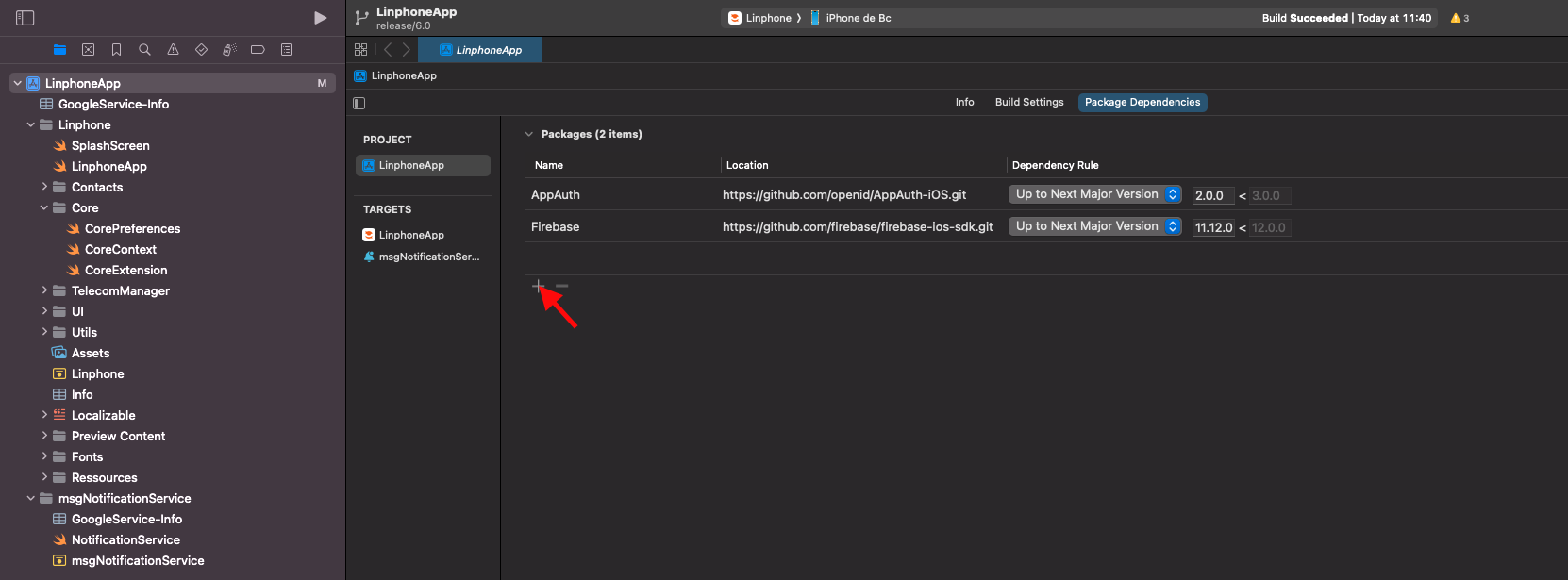
- In the top-right corner of the screen, enter the following URI: https://gitlab.linphone.org/BC/public/linphone-sdk-swift-ios.git
- Change the Dependency Rule to Branch, and enter the keyword stable.
- Click Add Package.

- A new page will open to let you add targets to the library. Normally, this is not necessary, as the dependencies on Linphone and msgNotificationService should already be present.
- Click Add Package.

- Make sure the library appears in the Frameworks, Libraries, and Embedded Content section of all targets that need it.

- Add it manually if needed.

Using a local linphone SDK (Optional)
- Clone the linphone-sdk repository from our GitLab:
git clone git@gitlab.linphone.org:BC/public/linphone-sdk.git
git submodule update --init --recursive
- Build the SDK:
cmake --preset=ios-sdk -G Ninja -B spm-ios && cmake --build spm-ios
- Go to the Package Dependencies section of your project (remove the remote linphonesw SPM from the package dependencies if necessary)
- Click on Add Local.

- Follow your path: yourSdkPath/linphone-sdk/spm-ios/linphone-sdk-swift-ios

- A new page will open to let you add targets to the library. Normally, this is not necessary, as the dependencies on Linphone and msgNotificationService should already be present.
- Click Add Package.
- Make sure the library appears in the Frameworks, Libraries, and Embedded Content section of all targets that need it.
- Add it manually if needed.