| Base.lproj | ||
| ca.lproj | ||
| cs.lproj | ||
| de.lproj | ||
| en.lproj | ||
| es.lproj | ||
| eu.lproj | ||
| fi.lproj | ||
| fr.lproj | ||
| hu.lproj | ||
| intentsExtension | ||
| Linphone | ||
| LinphoneApp.xcodeproj | ||
| LinphoneAppTests | ||
| LinphoneAppUITests | ||
| linphoneExtension | ||
| mk.lproj | ||
| msgNotificationService | ||
| nl.lproj | ||
| pt-BR.lproj | ||
| pt.lproj | ||
| ReadmeImages | ||
| ru.lproj | ||
| scripts | ||
| sk.lproj | ||
| uk.lproj | ||
| zh-Hans.lproj | ||
| .git-pre-commit | ||
| .gitignore | ||
| .gitlab-ci.yml | ||
| .swiftlint.yml | ||
| CHANGELOG.md | ||
| CONTRIBUTING.md | ||
| GoogleService-Info.plist | ||
| LICENSE.txt | ||
| README.md | ||
| Shared.xcconfig | ||

Linphone is an open source softphone for voice and video over IP calling and instant messaging. It is fully SIP-based, for all calling, presence and IM features. General description is available from linphone web site
License
Copyright © Belledonne Communications
Linphone is dual licensed, and is available either :
- under a GNU/GPLv3 license, for free (open source). Please make sure that you understand and agree with the terms of this license before using it (see LICENSE file for details).
- under a proprietary license, for a fee, to be used in closed source applications. Contact Belledonne Communications for any question about costs and services.
Documentation
- Supported features and RFCs : https://www.linphone.org/technical-corner/linphone/features
- Linphone public wiki : https://wiki.linphone.org/xwiki/wiki/public/view/Linphone/
How can I contribute?
Thanks for asking! We love pull requests from everyone. Depending on what you want to do, you can help us improve Linphone in various ways:
Help on translations
We no longer use transifex for the translation process, instead we have deployed our own instance of Weblate.
Due to the full app rewrite we can't re-use previous translations, so we'll be very happy if you want to contribute.
Report bugs and submit patchs
If you want to dig through Linphone code or report a bug, please read CONTRIBUTING.md first. You should also read this README entirely ;-).
How to be a beta tester ?
Enter the Beta :
- Download TestFlight from the App Store and log in it with your apple-id
- Tap the public link on your iOS device. The public link : https://testflight.apple.com/join/LUlmZWjH
- Touch View in TestFlight or Start Testing. You can also touch Accept, Install, or Update for Linphone app.
- And voilà ! You can update your beta version with the same public link when a new one is available
Send a crash report :
- It is done automatically by TestFlight
Report a bug :
- Open Linphone
- Go to Settings —> Advanced —> Send logs
- An email to linphone-iphone@belledonne-communications.com is created with your logs attached
- Fill in the bug description with :
- What you were doing
- What happened
- What you were expecting
- Approximately when the bug happened
- Change the object to [Beta test - Bug report]
- Send the mail
Building the application
What's new
With Linphone 6.0, we are switching to Swift Package Manager.
By default, the app uses a remote SPM repository: https://gitlab.linphone.org/BC/public/linphone-sdk-swift-ios.git
However, if you wish to use a locally built SDK, please refer to the section “Using a local Linphone SDK” below for instructions.
Building the app
Open linphone.xcodeproj with Xcode to build and run the app.
The remote SPM is already configured in the app.

Using a remote Linphone SDK (Optional)
If you want to switch the dependencies back to the remote SPM, here’s how to proceed:
- Go to the Package Dependencies section of your project.

- In the top-right corner of the screen, enter the following URI: https://gitlab.linphone.org/BC/public/linphone-sdk-swift-ios.git
- Change the Dependency Rule to Branch, and enter the keyword stable.
- Click Add Package.
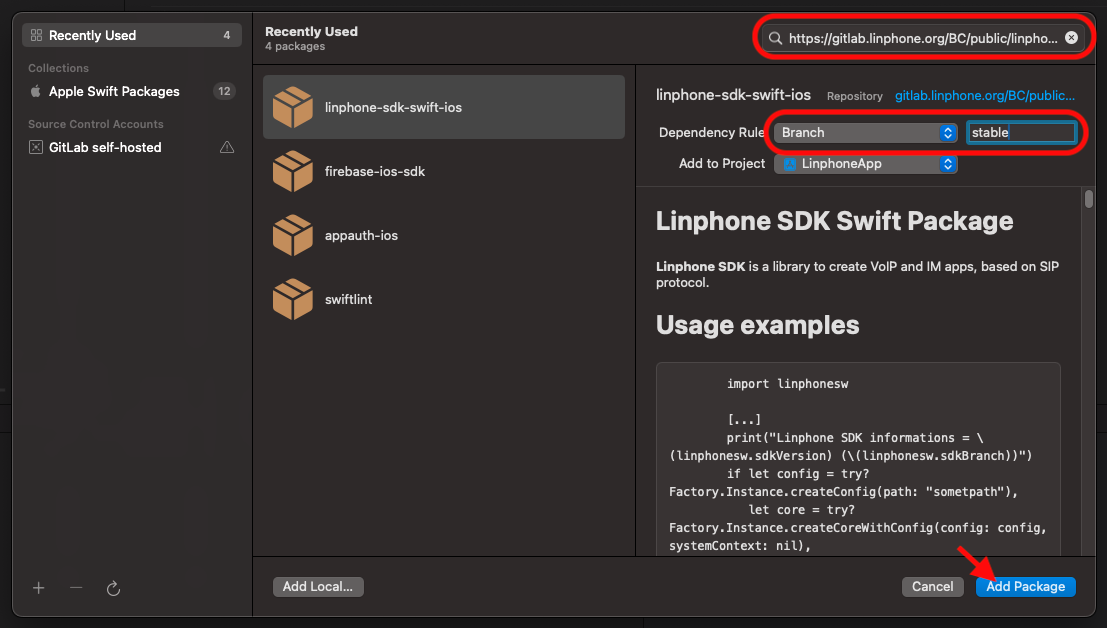
- A new page will open to let you add targets to the library. Normally, this is not necessary, as the dependencies on Linphone and msgNotificationService should already be present.
- Click Add Package.
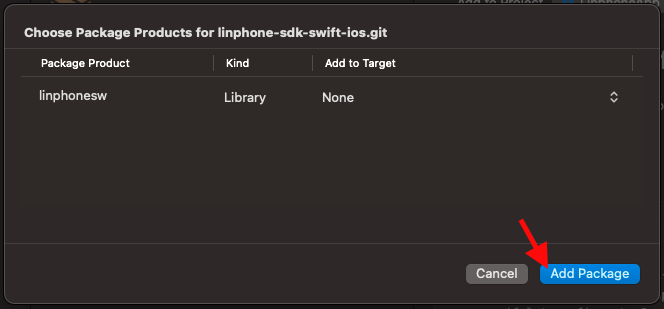
- Make sure the library appears in the Frameworks, Libraries, and Embedded Content section of all targets that need it.
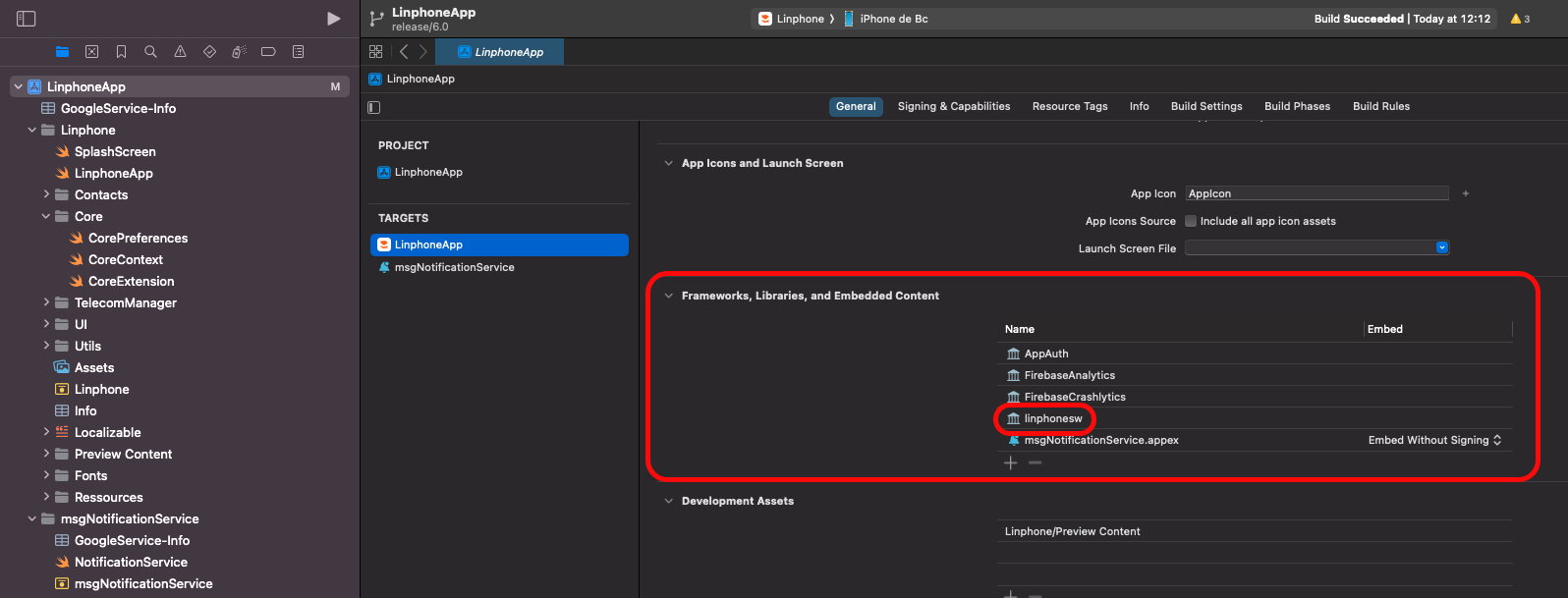
- Add it manually if needed.

Using a local linphone SDK (Optional)
- Clone the linphone-sdk repository from our GitLab:
git clone git@gitlab.linphone.org:BC/public/linphone-sdk.git
git submodule update --init --recursive
- Build the SDK:
cmake --preset=ios-sdk -G Ninja -B spm-ios && cmake --build spm-ios
- Go to the Package Dependencies section of your project (remove the remote linphonesw SPM from the package dependencies if necessary)
- Click on Add Local.

- Follow your path: yourSdkPath/linphone-sdk/spm-ios/linphone-sdk-swift-ios

- A new page will open to let you add targets to the library. Normally, this is not necessary, as the dependencies on Linphone and msgNotificationService should already be present.
- Click Add Package.
- Make sure the library appears in the Frameworks, Libraries, and Embedded Content section of all targets that need it.
- Add it manually if needed.
MDM (Mobile Device Management) configuration
Linphone iOS supports managed app configuration via the standard iOS MDM
com.apple.configuration.managed mechanism. When the app is deployed through
an MDM server, administrators can push a configuration dictionary that the app
reads at startup and whenever the managed configuration changes at runtime.
The following keys are supported:
| Key | Type | Description |
|---|---|---|
xml-config |
String | A Linphone configuration in XML format (same schema as linphonerc). Applied via Config.loadFromXmlString. |
root-ca |
String | A PEM-encoded root CA certificate used by the Linphone SDK for TLS operations (SIPS, HTTPS provisioning, …). Applied to core.rootCaData. |
config-uri |
String | URI to a remote provisioning file. When set, it takes precedence over any config-uri that may be defined inside xml-config, and triggers a core restart to fetch the remote configuration. |
Notes:
- All three keys are optional and can be combined.
- If
config-uriis present, it is set last and the core is restarted so that remote provisioning takes effect; anyconfig-urivalue embedded inxml-configis therefore overridden. - Applying and removing the managed configuration at runtime is supported: removing it resets the core to its default configuration and returns to the assistant/login screen.
Testing MDM configuration
Two kinds of tests are provided:
UI tests (end-to-end)
Located in LinphoneAppUITests/MDMChatFeatureUITests.swift. They inject a
managed configuration at launch via the app's DEBUG-only
UITEST_MDM_CONFIG launch-environment hook (implemented in
Linphone/LinphoneApp.swift), so no xcrun simctl setup is needed.
Note: the tests only cover MDM application (fresh launch with a managed config). Live removal of MDM while the app is running cannot be simulated from an XCUITest process (UserDefaults is per-process and we want the app to stay alive for a realistic removal scenario), so that path is covered by manual testing only.
Each MDM test case represents "a fresh device receiving a specific managed
configuration", so we uninstall the app before every test to avoid any
leakage of UserDefaults / keychain / provisioning / accounts between cases.
The wrapper script scripts/run-mdm-tests.sh does this for you.
The tests need a real SIP account to reach the main screen (the MDM XML embeds proxy + auth_info sections) and a remote provisioning URL for the config-uri test. Credentials can be provided three ways — the script resolves them in this order, highest first:
- CLI flags:
--username,--ha1,--domain,--config-uri(and--devicefor the sim UUID) - Shell env vars:
LINPHONE_TEST_USERNAME,LINPHONE_TEST_HA1,LINPHONE_TEST_DOMAIN,LINPHONE_TEST_CONFIG_URI - The gitignored file
scripts/test-credentials.env(copy from.env.example)
Examples:
scripts/run-mdm-tests.sh --device <uuid> --username alice --ha1 <md5-hash> --config-uri https://example.com/provisioning.xml
cp scripts/test-credentials.env.example scripts/test-credentials.env
# edit scripts/test-credentials.env, fill in LINPHONE_TEST_USERNAME /
# LINPHONE_TEST_HA1 / LINPHONE_TEST_CONFIG_URI
scripts/run-mdm-tests.sh
It will create+boot a throwaway simulator if DEVICE_UUID is not set,
uninstall the app before each test, run the tests one at a time with
-parallel-testing-enabled NO, and clean up at the end. To reuse an
already-booted simulator:
DEVICE_UUID=<your-booted-simulator-uuid> scripts/run-mdm-tests.sh
-parallel-testing-enabled NO avoids flaky UI test launch failures caused by
Xcode spinning up multiple simulator clones in parallel (the test-runner app
can fail to launch on a clone under pressure).
Covered cases:
testChatButtonHiddenWithMDMDisableChat— MDMxml-configwithdisable_chat_feature=1; the test reaches the main screen and asserts the chat button is hidden.testConfigUriMDMLandsOnMainPage— MDMconfig-uripointing at the URL supplied via--config-uri/LINPHONE_TEST_CONFIG_URI; the test verifies that remote provisioning completes and the app lands on the main screen.
Unit tests (MDMManager)
Located in LinphoneAppTests/MDMManagerTests.swift. The unit test covers
only root-ca application: it calls
MDMManager.shared.applyMdmConfigToCore(core:) directly on a throwaway
Core and asserts core.rootCaData matches the MDM-provided certificate.
The config-uri and xml-config paths are exercised end-to-end by the UI
tests above.
This requires a Unit Testing Bundle target in Xcode (separate from the UI
test target, because @testable import Linphone only works from a unit test
bundle):
- Xcode → File → New → Target → iOS → Unit Testing Bundle
- Name it
LinphoneAppTests, set "Target to be Tested" toLinphoneApp - Add
LinphoneAppTests/MDMManagerTests.swiftto that target
Then run:
xcodebuild test -project LinphoneApp.xcodeproj -scheme LinphoneAppTests -destination "platform=iOS Simulator,id=$DEVICE_UUID"